

 Móveis


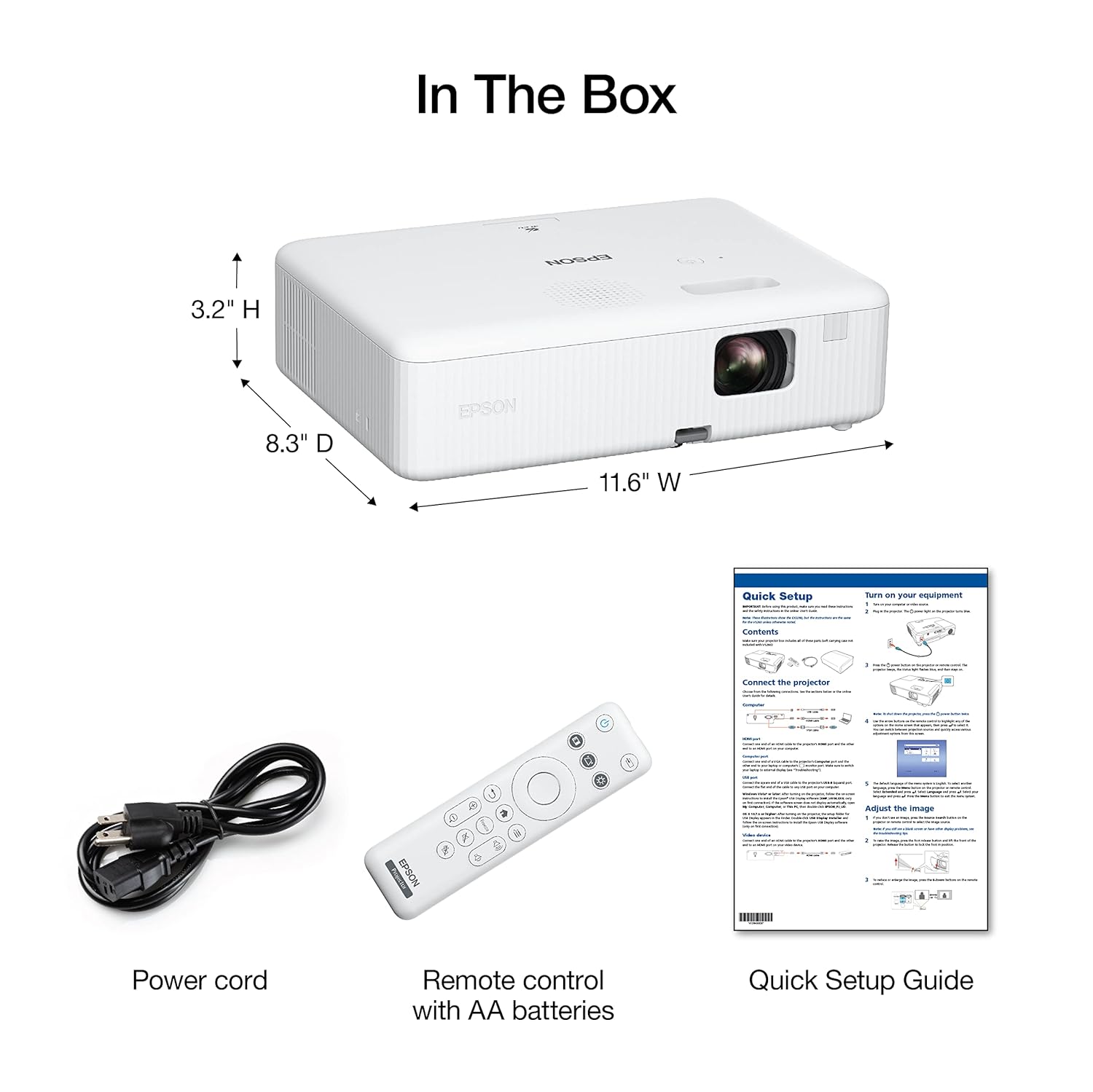

EPSON Projetor Powerlite W01, 3000 Lúmens, WXGA (Wide Screen), HDMI, Branco, Bivolt, Modelo: V11HA86020
R$3.534,61
Última atualização em 24/03/2026 23:18 Detalhes
0
Pessoas vendo este produto agora!
Descrição
- Excelente qualidade: resolução nativa WXGA (1280 px x 800 px), ideal para apresentações multimídia
- Função de ajustes simples: instalação mais rápida com o Quick Corner, que permite ajustar a imagem de projeção de forma simples e rápida
- Experiência natural: cores até três vezes mais brilhantes. a tecnologia 3LCD permite um equilíbrio mais preciso entre luz branca e colorida, proporciodo projeções realmente naturais
- Tipo de produto: VIDEO_PROJECTOR
- Voltagem110.0 volts
Informação adicional
| Marca | EPSON |
|---|---|
| Fabricante | Epson |
| Série | V11HA86020 |
| Certificação | Não aplicável |
| Cor | Branco |
| Formato | Portátil |
| Altura do produto | 3,4 polegadas |
| Largura do produto | 11,6 polegadas |
| Tamanho de tela vertical | 300 Polegadas |
| Resolução da tela | 1280 x 800 |
| Resolução | 1280 x 800 Pixels |
| Tecnologia de conexão | HDMI |
| Número de portas USB 2.0 | 1 |
| Número de portas USB 3.0 | 1 |
| Número de Conexões HDMI | 1 |
| Voltagem | 110 Volts, 220 Volts |
| Potência em watts | 100 watts |
| Fonte de alimentação | Energia elétrica |
| Pilhas ou baterias inclusas | Não |
| Número de unidades | 1 |
| Peso do produto | 2,4 Kilograms |
| Dimensões do produto | 21,08 x 29,46 x 8,64 cm, 2,4 quilogramas |
| Número do modelo | W01 |
| Descontinuado pelo fabricante | Não |
| Funciona a bateria ou pilha | Não |
| EAN | 0010343970373 |
| Dimensões do pacote | 36.7 x 32.5 x 16.1 centímetros |
| Disponível para compra desde | 27 outubro 2022 |
| Avaliações de clientes | 4,7 4,7 de 5 estrelas 717 avaliações de clientes 4,7 de 5 estrelas |
| Ranking dos mais vendidos | Nº 1.248 em Eletrônicos (Conheça o Top 100 na categoria Eletrônicos) Nº 26 em Projetores |
Avaliações (13)
13 avaliações para EPSON Projetor Powerlite W01, 3000 Lúmens, WXGA (Wide Screen), HDMI, Branco, Bivolt, Modelo: V11HA86020
Limpar filtros
Mais Produtos


O preço original era: R$229,00.R$175,18O preço atual é: R$175,18.


O preço original era: R$63,80.R$50,26O preço atual é: R$50,26.


Produtos relacionados
O preço original era: R$760,00.R$607,98O preço atual é: R$607,98.


O preço original era: R$199,90.R$184,00O preço atual é: R$184,00.

O preço original era: R$149,90.R$99,90O preço atual é: R$99,90.


Ivan Bandeira de Oliveira –
Projetor é ótimo
James L –
Having been forced to toss out a few lower-priced, but vastly inferior single-chip LCD projectors (with burn marks on the polarizer), I am so very impressed with this capable Epson-quality, ultra bright, long-lasting and flexible projector, I managed to grab a 28% off deal.
I have stretched and stapled a screen over a 108”x60” frame built with 2”x2” wood, resulting in a wrinkle-free 124” (10 foot) screen measured on the diagonal. With the ceiling installation of this Epson projector I have the equivalent of a 10-foot HD TV for roughly $550 all-in.
Sure, it is at the low end of Epsons’ offerings, but it creates a supersized, immersive big screen experience for streaming movies at home as well as for delivering sharp presentations in smaller office settings. The CO-W01 delivers an amazingly bright, sharp, crisp and clear image perception in vibrant, vivid colours, even with ambient light. It can achieve all this with up-to an impressive 300 inch display.
The stated colour brightness of 3000 IDMS 15.4 lumens (equals roughly 3750 ANSI lumens ! ) has been notably verified by independent test results reported in reviews posted on-line. [According to the ISO 21118 standard, a single ANSI Lumen should equal 0.8 ISO Lumens]. An ideal lumen range for multi-purpose spaces is 2000 to 4000 ANSI lumens.
For rooms with low ambient light you can select the ‘ECO’ Light Output setting (using a dedicated button on the remote) which slightly reduces brightness, providing a better contrast ratio for darker black-level performance, extends bulb-life, and also reduces power consumption and fan noise (from 38 dB to 29 dB, very noticeably quieter). A personalized selection from various Picture Modes can enhance the experience.
In bright rooms, and for larger screen sizes, the ‘High’ Light Output setting bumps brightness up to the maximum when you need need a higher brightness to deliver quality images that are significantly less washed-out by excessive ambient light.
To protect the bulb, the projector slowly warms up for 30 seconds or so before reaching maximum brightness. Lamp-hours-used under each Light Output mode can be displayed in the Info Menu.
The advanced 3-chip 3LCD technology (one chip for each primary color: red, green and blue) displays 100% of the RGB colour signal for every frame. This provides outstanding and realistic colour accuracy, up to 16.77 billion colours, and better performance by providing colour with up to three-times the illuminance over a single-chip LCD projector at equal lumens level. The projected image is crisp and bright, even at the corners.
Of course, a menu ‘Projection’ option can flip the picture for ceiling mounting. A manual keystone correction can properly adjust otherwise skewed or crooked image proportions, when projected at an angle, (as much as 30 degrees for this projector). I was pleasantly surprised that the ceiling-mounted projector reacts to commands from the remote even from directly beneath it.
There is a manual focus lever and menu-selected digital zoom (optical zoom not available). Menu options permit adjustments to aspect ratio and colour mode. Picture Shift is a handy feature to help centre the image on a screen.
While the resolution of the projector may seem odd, and to lean into the Epson forte for office presentations from computers, rest assured it is indeed high-definition (HDTV) quality and Epsons’ SizeWise chip ensures support for other display resolutions (up to and including Full HD 1080p (1020 x 1080) video via HDMI). The aspect ratio is 16:10, with a native WXGA resolution of 1200 x 800 Pixels or 1,024,000 dots (roughly the 720p (1280 x 720) being broadcast by many TV stations). It is not 4K compatible.
The CO-W01 had a long lamp life of up to 6,000 hours ( 12,000 hours in ECO mode, equivalent to nearly 7 years of viewing at 5 hours per day). It is a great value for the money, especially when compared to the relatively short life of lower quality single-chip LCD projectors often reported (in 1-star reviews) as susceptible to projecting anomalous images, resulting from burn marks on the polarizer (progressing from yellow/orange, through brown, to black) after a just few months of use.
Directly connect an HDMI cable from, a laptop, cable/satellite box, DVD player, gaming console, or your preferred streaming device. I have an ‘HDMI switch’ that easily enables alternating between Fire Stick or satellite receiver.
Unfortunately, the 5 watt built-in speaker is not very impressive. Strangely, there is no 3.5mm jack for sound output, but this deficiency can easily be overcome by inserting an inexpensive ‘HDMI Audio Extractor’ in the HDMI cable linkage to provide the ‘3.5mm jack’ needed to run a separate cable from the Audio Out port of the Extractor to a sound system input.
The USB Type-A port permits connection of USB thumb drives, or the USB power cable from a Fire Stick (providing sufficient 5v, 2A). Sadly, the projectors’ USB file support is very-limited to; .jpg , .bmp , .gif , .png , and .avi (720p and < 2 gb).
Rossi Monteiro –
Ótimo projetor e de fácil uso e instalação!
Kelsey –
Muy buen proyector Epson, ya lo he utilizado y se ve muy bien en un salón de clases con 50 alumnos, el salón es de 9m x 9m aun con claridad en las ventanas. Ampliamente recomendado.
Carlos Alexandre –
Um produto de altíssima qualidade
Ana Maria –
Muito bom. Imagem perfeita e fácil manuseio. Já uso há 1 ano em minhas aulas e nenhum problema.
Elizabeth –
A mídia não pôde ser carregada.
Okay this does mis advertised as built in wifi. The company said that it’s not true, however, it is true and I was able to find the wifi on my network after disabling AP Isolation in my router settings. I reset everything as I honestly don’t know much about setting up a network.
I use my Amazon Fire TV stick 2nd generation and plug the USB into the device, and it doesn’t overheat as it does when plugged into the wall circuit with a plug.
Optimal settings.. eco mode, rgb color, and on the streaming device, color up to 12 bits, disable HDR, and auto everything else. I did set it at 1080p 50hz , not 60 and the results are amazing, with no latency while watching media. Does not get hot anymore when used on ECO mode.
Disable CEC mode in FIRE TV as it allows Epson remote to control it, and noticed the channels being changed without me doing it. CEC allows a remote to control the other device.
Would like to see more guided tutorial about the LAN feature that is sold separately and costs 120usd the elpap11 is the one that is compatible and is used to only display IMAGES, not live content like video. Used more for business and school situations.
HDMI EQ setting I used option 1, as it worked best for my environment. You may need to test them all 1-3 out for personal preference. The HDMI EQ (Equalization) setting on a projector is used to fine-tune the signal strength received from devices connected via HDMI.
* Purpose:
* Improve Signal Quality: It helps compensate for signal degradation that can occur due to long HDMI cables, signal interference, or issues with the source device.
* Resolve Display Problems: If you’re experiencing problems like flickering, no image, or distorted video, adjusting the HDMI EQ setting might help restore a stable and clear picture.
The listing advertised this CO-W01 PROJECTOR as having ZOOM for video meetings. It doesn’t have ZOOM video calling app, it has the feature ZOOM in, and ZOOM out for enlarging and decreasing the view area. Maybe have Epson prepare the content for Advertising. The Epson employee did say this (built in wifi) is incorrect as to what is being advertised. Initially, I did try to return this projector and couldn’t, no idea why. However, Epson said if I provide my receipt of purchase near the end of warranty, I they would switch it out or something (I forgot specifically) . I did register this product and Epson rep said I didn’t have to, as this is a basic projector with no updates.
I definitely recommend this projector to anyone as the picture is amazing it has 3000 lumens and is HD high definition displaying at 1080p and I was able to confirm this by viewing the projector status within the projector settings. I did try GOOGLE Chromecast HD, and had a yellow tinge, and kept asking me for my passwords, and I think I have to fix the settings, but gave up as this was too time consuming and I’m decent at figuring out these things.
Mirroring my phone: using Fire TV, I successfully mirrored my Samsung phone using Samsung smart view feature.
FIRE TV has option for Apple products as well to be mirrored. My Android phone projection was great, as it showed text with clarity.
Using the zoom and native resolution settings, I effectively mirrored my phone to my liking. I get eye strain from using my phone and mirroring it makes it better for my eyes.
I use this in daylight and it’s very bright. At night, it’s even more brilliant in terms of enhanced visuals. If you’re looking for a projector where it has a streaming service, and wifi that you can easily access, then consider their other model. I paired my JBL ear buds to my FIRE TV STICK flawlessly and noticed without that, using the setting to source the audio out to A/V is best and could be heard better, although that’s dependent on the audio used for the content as they all differ. Great basic projector. I will next be looking into the mini EF laser one if I decide to upgrade.
Kelsey –
Very bright! I have no issue with seeing the picture with ambient light/lamps on. I’ve traded out my tv for a projector. It’s even bright enough that I can use it during the day with blinds open. It can be a little faded during bright afternoon sun but not unwatchable. The fan can be loud but if you hit brightness on remote, it’ll turn it to eco mode and it almost completely eliminates the noise with minimal picture change. Definitely recommend connect to a speaker, built in speaker is not great
JOAO RIZONALDO FERNANDES –
Muito bom, tem uma imagem excelente.
Edilian oliveira –
muito bom o produto
Marcelo Miná Dias –
Minha avaliação é sobre para apresentações em aulas. Especificamente em salas para até 60 pessoas com iluminação externa parcial e sem incidência direta na imagem projetada. Mesmo no modo econômico, consigo excelente qualidade de imagem para gráficos, ilustrações, fotografias e texto com letras miúdas. Projeto direto na parede branca. Imagino que os resultados em telas especiais sejam ainda melhores.
A possibilidade de ampliação da imagem sem perda de qualidade é impressionante.
Os resultados com projeção de vídeo são muito bons, mas qualidade superior requer ambiente mais escuro, como era de se esperar.
Não me fez falta a ausência de controles no próprio aparelho. O controle remoto é bem simples e funcional. É bastante silencioso e o autofalante é razoável, mas insuficiente para a sala que utilizo 60 metros quadrados, aproximadamente.
Muito satisfeito com o produto.
Dayane Souza –
Posso utilizar nas salas de aula mais claras, então me é muito útil. Utilizo já há 1 ano ou mais.
Tracy Blaikie –
I have been using projectors instead of a regular TV for about 11 years now. This is my 3rd projector.
It took a little bit to get the projected image just right but I can’t say enough good things about this piece of hardware. I use it on my wall, which is 173″ diagonally, and the picture is crystal clear! The color is sharp, vibrant and bright ( even with setting it to Eco Mode ). The fan is so quiet it’s not even noticeable. I just love this projector, especially for the price!